Revealing Passwords with
Inspect Element
In both Chrome and
Firefox, you can use the Inspect Element tool to uncover saved passwords on any
website.
Simply go to the site
where you have a password saved and highlight those little black dots. Once
those dots are highlighted, right-click and select the Inspect Element opt
When you click on
Inspect Element, you will be able to see the webpage's code. This new frame
should appear at the bottom of your browser window.
Since you have already
highlighted the part you are interested in, the password section, it will
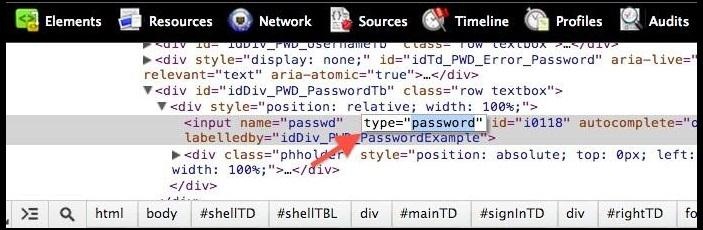
automatically be highlighted, as you can see in the image above. If you just
see the black bar in Firefox, you may have to open the Markup Panel, as seen below.
In order to unveil the
saved password, you are going to have to alter some text. Locate where it
says type ="password".
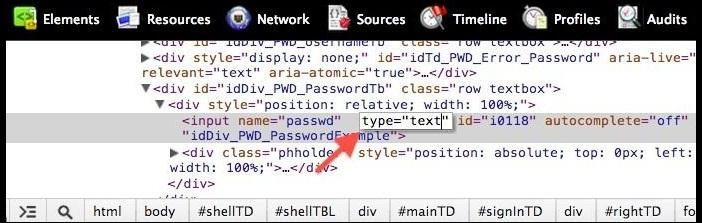
Select the text password and hit Delete. Now, replace it with the word text.
Now, press Enter. The second you do, the password box that was
previously filled with those standard security dots will now show the complete
text of whatever password was saved there.
Obviously, this could
be used to reveal other people's passwords, too. Like, if your fooling around
on your friend's computer, or if some bozo actually saved his/her password on a
public computer. Boy, what you could do with somebody else's password!


I

No comments:
Post a Comment